Where the Download Goes Wrong (and How to Fix It)
Most players who search «Fishin' Frenzy APK» end up downloading a fake clone or a wrapper that leads to an unlicensed site. The game itself doesn't have a standalone app; it lives inside casino operator apps or runs in a mobile browser, and both paths are faster and safer than hunting for an APK file that doesn't officially exist.
This page walks through every legitimate install route—browser play, add-to-home-screen shortcuts, operator apps from the Play Store and App Store, and the rare cases where an APK makes sense—then shows you how to spot the fakes and which permissions should raise a red flag before you hand over your phone number or payment details.
The Game Card (What You'd See in a Store Listing)
If Fishin' Frenzy were a standalone app, here's what the store page would look like. In reality, you'll see these details inside an operator's casino app, where Fishin' Frenzy appears alongside hundreds of other slots.
The version number refers to the game build; the operator app itself updates separately. Blueprint pushes new builds to fix bugs or tweak animations, but the maths—RTP, volatility, paytable—stays locked after certification.
Five Screens You'll Actually See (and What They Mean)
- Login or age-gate screen – Every UKGC-licensed operator checks your age and identity before you can deposit, and many hide the game lobby until you've logged in. You'll enter your date of birth, postcode, and the last four digits of your debit card or driving licence; the operator cross-checks this with credit-reference agencies. Budget 24–48 hours for document upload if it's your first withdrawal.
- Game lobby and search – A scrollable grid of slots, with filters by provider, theme, volatility, or jackpot type. Type «Fishin'» into the search bar, tap the tile, and the game loads in a few seconds. The lobby also shows your recent plays and favourites.
- Game-load screen with the Blueprint Gaming logo – A two-second animation of the studio badge and the game title. If you see a different provider name here, you've landed on a reskin or clone.
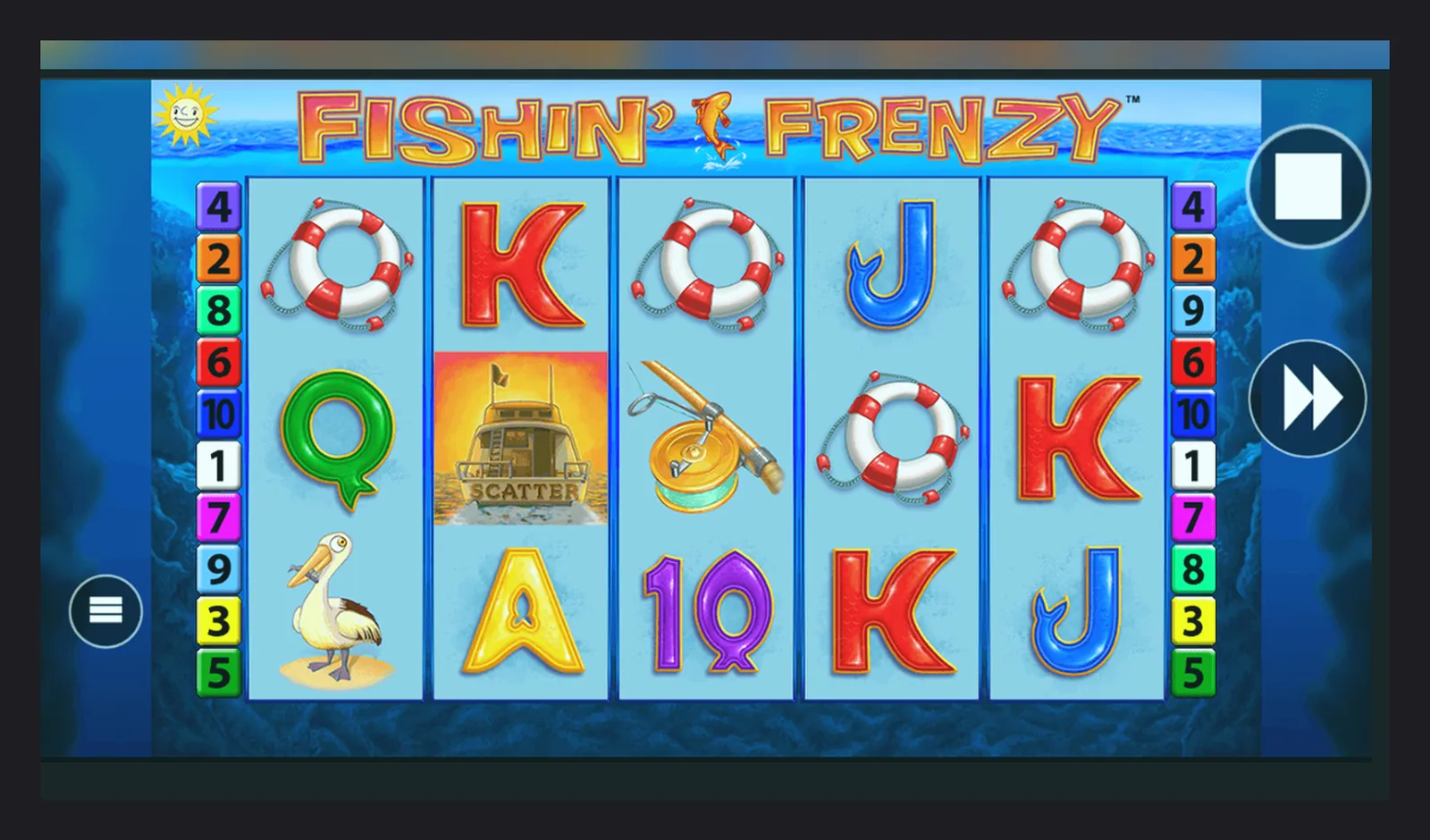
- Main reel screen – Five reels, three rows, ten paylines, the fishing boat bobbing at the top, and a control strip at the bottom with stake, spin, autoplay, paytable, and settings. Stake buttons jump in fixed increments: £0.10, £0.20, £0.50, £1.00, £2.00, £5.00. Players aged 18–24 hit a £2.00 cap; everyone else can go to £5.00.
- Free-spins screen – Triggered by three or more scatter symbols (the fisherman). The boat casts lines into the water, hooks fish symbols that landed during the spin, and awards their instant prizes. Ten spins, retriggerable, and the biggest wins come from filling all positions with high-value fish.
You won't see separate settings for sound, graphics quality, or battery-saver mode; those sit inside the hamburger menu in the top corner. Tap the «i» icon to open the paytable, which lists every symbol value at your current stake and explains the free-spins mechanic in detail.
Four Install Paths (Ranked by Risk)
Each method has trade-offs. The browser path is instant but means typing the URL every time; the operator app gives you one-tap access but takes up 100 MB of storage; the APK route is almost always a trap unless you know exactly what you're downloading and why.
- Browser play (zero risk, zero install) – Open Chrome, Safari, or Firefox on your phone, navigate to a UKGC-licensed operator, log in, find Fishin' Frenzy in the lobby, and tap Play. The game runs in HTML5 and adapts to your screen size. No download, no permissions, no storage cost. The catch: you need to bookmark the site or type the URL each time, and some operators bury the mobile site behind an app-install prompt.
- Add to home screen (low risk, takes 30 seconds) – Once you've loaded the game in the browser, tap the Share icon (iOS) or the three-dot menu (Android), then «Add to Home Screen». This creates a shortcut that opens the game directly, bypassing the browser chrome. It's not a native app—just a bookmark with an icon—but it feels like one. The operator's site updates automatically, so you're always running the latest version. Risk: if the site loses its UKGC licence or goes offline, the shortcut breaks.
- Operator app from the Play Store or App Store (medium risk, 2–4 minutes) – Search for the operator's name—«Betfred Casino», «Sky Bet», «Paddy Power Games»—in the official store, check that the developer name matches the brand, read the permissions (should be camera for document upload, location for geofencing, notifications for bonuses), and install. Open the app, log in, navigate to Slots, and find Fishin' Frenzy. The app caches lobby data and loads games slightly faster than the browser, but it's 80–120 MB and asks for more permissions. Risk: if you download the wrong app—one letter off in the name—you might hand your login to a phishing site. Always check the UKGC register and match the licence number in the app footer before you deposit.
- APK sideload (high risk, only for advanced users) – Download an APK file from a third-party site, enable «Install from unknown sources» in Android settings, and run the installer. This path exists for operators who can't list their app in the Play Store due to local restrictions, but in the UK, every licensed operator already has a store presence, so an APK is almost always either outdated, repackaged malware, or a shortcut to an unlicensed site. Risk: the APK can request any permission—contacts, SMS, call logs—and there's no automatic update path, so you're stuck on an old version with known bugs or security holes. If you're set on this route, download only from the operator's own domain (check the WHOIS and SSL certificate), scan the file with VirusTotal before you run it, and revoke permissions you don't recognise immediately after install.
What Your Phone Needs (and What Slows It Down)
Fishin' Frenzy runs on almost any phone made in the last five years, but older devices struggle with the free-spins animation when the boat hooks multiple fish at once. Here's what matters.
- Operating system: Android 7.0 (Nougat, released 2016) or iOS 13 (released 2019) as the baseline. Blueprint's HTML5 build uses WebGL for the water effects and fish movement, which needs hardware acceleration; phones older than 2017 either disable those effects or show a choppy framerate.
- RAM: 2 GB minimum, 3 GB comfortable. The game itself sits at 40–50 MB of active memory, but the operator app or browser tabs eat another 200–400 MB. If you run Spotify, WhatsApp, and three Chrome tabs in the background, expect lag when the free spins trigger.
- Screen: 1280 × 720 pixels or higher. The game scales down to smaller screens, but on a 480 × 800 display (budget phones from 2018), the buttons overlap and the paytable becomes unreadable. Blueprint recommends a 5-inch screen minimum.
- Connection: 3 Mbps down, 1 Mbps up, stable. Each spin sends 2–5 KB of data to the server and receives 5–10 KB back; a dropped connection mid-spin freezes the reel animation, but the server still processes the result and credits your balance once you reconnect. Playing on patchy 4G in a moving train means you'll see the «Connection Lost» overlay every few spins.
- Battery: a 3,000 mAh battery drains 8–12% per hour of continuous play with the screen at 50% brightness. The WebGL animations are the culprit; if you switch to low-graphics mode in the settings, battery drain drops to 5–7% per hour.
Storage is rarely the bottleneck—the operator app takes 80–120 MB, the game cache adds another 20 MB—but if you're on a 16 GB phone with 2 GB free, you'll hit «Storage full» errors mid-download.
How to Spot a Fake (and Which Permissions Are Red Flags)
Clones and wrapper apps flood the APK sites because Fishin' Frenzy is one of the UK's most-searched slot names. The fakes copy the logo and reel layout but route your deposits to unlicensed sites or harvest your payment details. Here's what to check before you tap Install.
- Developer name in the store listing – Blueprint Gaming never publishes direct-to-consumer apps; the developer field should show the operator's legal name (for example, «PPB Entertainment Limited» for Paddy Power, «Betfred Limited» for Betfred). If the developer is «Fishin Frenzy Studio», «Slots Ltd», or any variation that doesn't match a UKGC licensee, it's a fake.
- Licence number in the footer – Open the app, scroll to the bottom of any page, and look for a statement like «Licensed and regulated by the UK Gambling Commission, licence 000-000000-R-123456-001». Copy that number, paste it into the UKGC public register, and confirm the operator name matches. No licence number in the footer means the site is illegal to serve UK players.
- Permissions requested – A legitimate casino app asks for camera (to scan ID documents), location (to verify you're in the UK), and notifications (for bonus alerts). Red flags: contacts (why does a slot need your address book?), SMS (to send premium-rate messages), phone (to make calls on your behalf), and «access all files» (to exfiltrate photos or documents). Revoke any permission that isn't explained in the install prompt.
- APK file size and signature – An operator app is 80–120 MB; a standalone slot is 40–60 MB. If the APK is 8 MB, it's a web-view wrapper that loads a remote site—possibly unlicensed. Check the signature: long-press the APK in your file manager, tap Properties, and look at the certificate details. A legitimate app is signed by the operator's company name and has a validity period of 25+ years. A fake is signed by «Android Debug» or a random string and expires in a year.
- Update frequency – Blueprint pushes updates every 4–8 weeks to fix bugs or comply with new regulations (the £2.00 stake cap for 18–24s, added in October 2024, required a patch). If the «Last updated» date is over six months old, the app is either abandoned or never official to begin with.
FAQ
Can I play Fishin' Frenzy for free without signing up?
Some UKGC-licensed operators show a demo version after you log in and pass age verification, but free play without an account is rare because the regulator requires identity checks before you access gambling content. If you find a site offering instant demo play with no sign-up, it's likely unlicensed and outside UK jurisdiction.
Why does the app ask for my driving licence and a selfie?
Know Your Customer checks are mandatory under the Gambling Act. The operator verifies your age, identity, and address before your first deposit, then requests documents again before your first withdrawal—usually a photo ID and a recent utility bill. The process takes 24–48 hours, and affordability checks kick in once your net deposits hit £150 in a month, using credit-reference data at the first stage.
What's the difference between the operator app and the browser version?
Both run the same HTML5 game build from Blueprint Gaming, so the RTP, paytable, and features are identical. The app caches the lobby and loads slightly faster, but it takes 80–120 MB of storage and asks for more permissions. The browser path is instant, zero install, and works on any device, but you need to bookmark the site or type the URL each time.
Is it legal to download a Fishin' Frenzy APK from a third-party site?
Downloading an APK isn't illegal, but playing on an unlicensed site is. If the APK routes you to a casino without a UKGC licence number in the footer, the operator is breaking UK law, and you have no consumer protection—no dispute resolution, no self-exclusion link to GAMSTOP, no guarantee that the RTP matches the certified version. Stick to operators in the UKGC public register.